SEO for Authors

Micro-Syndication Magic: How to Annoy Many People At Once Using Social Network Syndication

Posted on by Caleb J Ross in Marketing, SEO for Authors | Leave a comment

The people in my head often ask me, “Caleb, how are you seemingly in so many places online at once?” The simple truth is: magic. But not everyone is born with this gift (or curse, depending on which side of the superhero spectrum I’m internally agonizing over at the time). Over the years I’ve built up a failsafe system, though, so should Cash-4-Kryptonite stores suddenly saturate my suburb, I’ve got measures in place.

Here’s my method.

1. Establish a “content spring”

I’m an organization nut. I need structure to survive. Online, when new social media networks materialize daily, organization can be tough. It is important to establish a “content spring,” a source from which most of your content will originate. The goal being to focus content creation efforts in a single place to avoid feeling overwhelmed by so many points of entry. In a perfect world, with perfect organization, you would be able to syndicate your content throughout your social networks with a single push of the “publish post” button.

The most logical content spring is the good ol’ fashion blog. Blogging platforms have evolved considerably over the past few years, with most blog sites having enormous inbuilt configurability. For The World’s First Author Blog I use the WordPress platform, which is perhaps the most configurable of all blogging software. Expect most of this post to skew appropriately.

2. Map your content routes (or, “build some tributaries,” if you want to maintain the spring motif)

Step three will detail a few of the tools I use to get my content from the spring to..I don’t know, the ocean maybe, but before that, in keeping with my penchant for organizational nerdery, it’s important to map out exactly where you would like your different types of content to ultimately appear. Emphasis intentional: the idea of micro-syndication relies of focusing your content for specific audiences, even niche audiences within your own readership.

“But Caleb, I want ALL of the content to go EVERYWHERE.” Well, hypothetical dissenter, while total media saturation may seem like a good goal, resources, time, and an ethical aversion to spamming friends and strangers should keep you from acting on this impulse.

The goal of micro-syndication is to ensure that the right content gets to the right people. When you write a fantastic blog post about micro-syndication, your family and bar buddies on Facebook might not care. And all those Twitter bots that you think hang onto your every tweet, they don’t care either. But your readers and your marketing and social media friends might care a lot.

I’ll use myself as an example. I have a personal Facebook page, a professional author Facebook page, various Twitter accounts (primarily my @calebjross account), a LinkedIn profile, and a few other profiles and websites. When I write a blog post, I don’t necessarily want to bombard every contact. What to do?

3. Establish the filters (or, setting up strategic dams, or whatever fits with the spring thing. I’m beginning to regret this stupid running metaphor.)

Know which tools are available and how they can help. Here are a few I use daily.

  

Twitterfeed

For highly customizable distribution to Facebook, Twitter, and LinkedIn (and fingers crossed more platforms in the future), nothing beats Twitterfeed. By using RSS feeds (which come built-in with most blogging platforms) Twitterfeed allows the user to direct specific feeds to specific social sites. What makes this system great is that by using category and/or tag data from your blogging platform, you can fine-tune the distribution path of your content.

For example, I have my main homepage feed:

www.calebjross.com/feed (“feed” may be a variety of RSS extensions. The WordPress default is “feed”)

Which I send to my author Facebook page as well as my Twitter account (both accounts I use almost exclusively for reader/writer information).

However, sometimes I create content on my homepage blog that isn’t very writerly, content that perhaps is better meant for those friends, family, and bots. In that case, I simply categorize the post as “un-writerly,” which creates this feed:

www.calebjross.com/category/un-writerly/feed

Twitterfeed has been set up to publish only posts from this feed to my personal Facebook page. Neat.

YouTube Playlists combined with Shortstack and the YouTube SEO Playlist plugin

With videos, my content spring is YouTube (I could host videos on my own site, but why the hell would I do that?) Now, take the concept of categories and tags described above and apply to video playlists. As I upload videos to the Caleb J. Ross YouTube channel, I assign them to playlists organized primarily for the purpose of syndication.
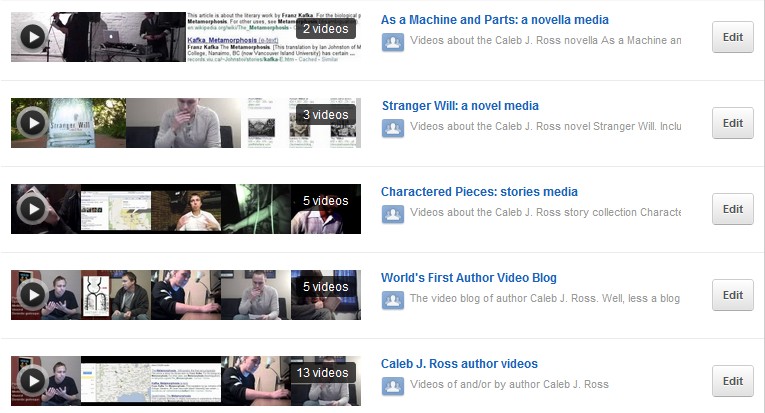
The next step is simply finding tools to aggregate the videos. This is where the Shortstack app and the YouTube SEO Playlist Wordpress plugin come into play. Using the YouTube SEO Playlist plugin I am able to have videos from specific playlists automatically populate on my website. Head over to any of my book pages (Charactered Pieces: stories, for example) or my Author Video Blog page. Notice that only Charactered Pieces: stories related videos appear on the book page and only episodes in my author video blog series appear on the Author Video Blog page? That syndication is entirely automatic.

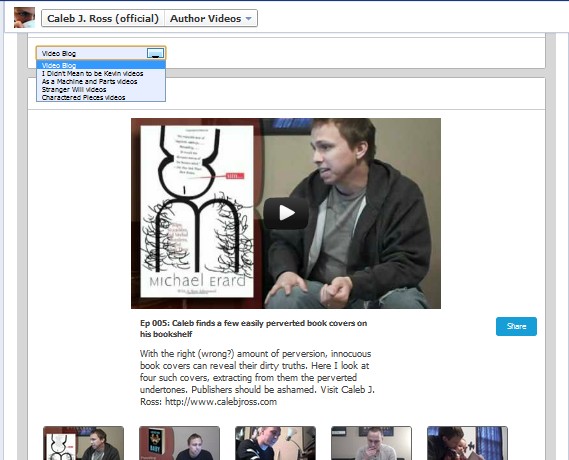
This very same concept has been applied to my author Facebook page, using the Shortstack app. Notice the dropdown menu used for selecting playlists. Awesome.
Another syndication solution to consider is Ping.fm. This service allows a single social network message to populate to 30+ different networks. It sounds pretty great until you realize that most of the networks are small, lesser-known properties (myYearbook, StreetMavens, Yammer, and others). I haven’t used Ping.fm yet (this post will be the first I attempt to distribute using the service). If anyone out there has used the service, I’d love to know your thoughts. And in keeping with the ease of syndication theme here, the WPing.FM plugin is available to further streamline distribution by connecting WordPress with Ping.fm.

Tumblr and the Tumblrize WordPress plugin

Tumblr is an enormously popular blogging platform, thanks in part to its effective merging of twitter-like following capabilities, Facebook-like social group curation, and traditional long form blogging capabilities. Because the network is so huge, it’s important for an author to be there. Luckily, the Tumblrize plugin is here to auto-populate posts from a primary blog to a Tumblr blog. And I know, all you SEOs out there, that I run the risk of duplicate content. For now, I’m testing that risk.


On-Site Syndication/On-Site Curation

Micro-syndication is important, but what about ensuring that the content you create is easily accessible to the right visitors on your site itself? I call this…wait for it…on-site syndication (I provide naming things consulting services at a fair rate). Traditionally, on-site organization has simply been part of a greater conversation called site navigation. But I think it deserves specific attention.

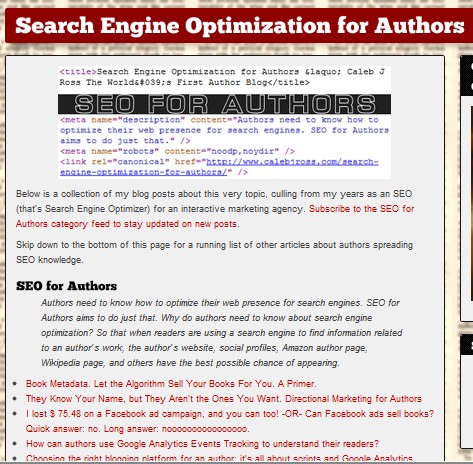
One of the most effective examples of on-site syndication/curation is my use of category pages to organize particularly important blog post categories, effectively creating a type of micro-site with each category. Check out my SEO for Authors category (screenshot below), Book Marketing Tests & Studies category, or the World’s First Author Podcast category for examples.

Book Metadata. Let the Algorithm Sell Your Books For You. A Primer.

Posted on by Caleb J Ross in Marketing, SEO for Authors, Study (the world/the craft) | Leave a comment

There’s a rule when it comes to search engine optimization: Content is King. Basically, this means that above everything else—all the link building, code tweaking, and social networking—the most important factor of any well-optimized web presence is the content itself. What good is your website without compelling content? And without compelling content, how can you expect other websites to link back to yours? I would go so far as to suggest the rule should be Content is God, but then we lose out on the lovely alliteration.

But the Content is King rule governs everything, not just your website or social profiles. Your books themselves actually contain Kingable Content that can be tweaked and optimized for marketing benefits. I’m not suggesting that you to manipulate your book’s words for the sake of search engines; that would be [keyword]ing+<h1>stupid</h1>. Rather, I’m here to clue you in to an area of underutilized content that supports your book even after publication. Metadata.

What is Metadata?

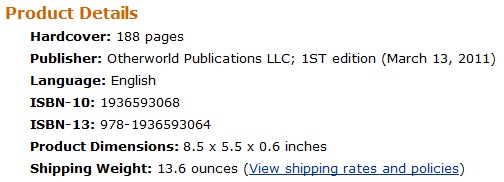
Metadata, whether it’s book metadata or webpage metadata, is basically the same thing: behind-the-scenes data (subject, genre, theme, etc.) that describes the front-and-center content (the book itself). The categories assigned to help shelve books within the Dewey Decimal system, that’s a form of metadata. Those Product Details on every Amazon.com book page. That’s metadata. When you do a search on a computer for an author or topic, the search results are partially powered by metadata. Those Amazon.com If You Liked ____, You May Also Like ____ recommendations…metadata factors in to those.

Why Care About Metadata?

The more information available to search engines and book sites about your book, the more information those search engines and book sties have to use in providing relevant results and recommendations to readers. And while descriptions such as publisher, shipping weight, and product dimensions (pictured above) may be useful for some purposes, they don’t speak to the general concerns of most readers, such as theme, genre, subject, etc. That’s where enhanced metadata comes in.

Not many people realize just how deep the metadata rabbit hole goes. Which is why, for lack of a better term, I’m using “enhanced metadata” to refer to all those unseen rabbit hole nooks and crannies. Enchanced metadata allows you, the author or the reader, to supply book sites with in-depth information about a book. Such information may include, but is not limited to:

  • fiction or nonfiction categorization
  • genre
  • subjects
  • pace
  • tone
  • writing style
  • perspective of the narration
  • tense (past, present, future)
  • are there strong male or strong female characters
  • errata
  • movie connections
  • books that influenced this book
  • books influenced by this book
  • books that cite this book
  • books cited by this book
  • characters
  • first sentence
  • how many characters does the book follow
  • literary devices used

Where Can Metadata be Manipulated?

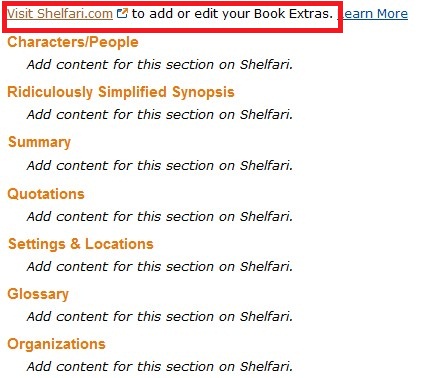
Shelfari (refers to enhanced metadata as Book Extras)

Shelfari is a social networking and book cataloging site which powers much of the enhanced metadata provided to Amazon.com. Existing Book Extras data can be seen either by accessing a particular book’s page at Shelfari.com or by accessing the book’s page via your Author Central account at Amazon.com.

More about Shelfari Book Extras

Goodreads (refers to enhanced metadata as Book Metadata)

Goodreads, like Shelfari, is a social networking and book cataloging site. Goodreads feels to me like a much more engaging platform than Shelfari, with far more opportunities for networking with readers.

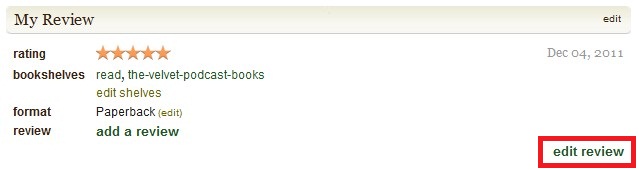
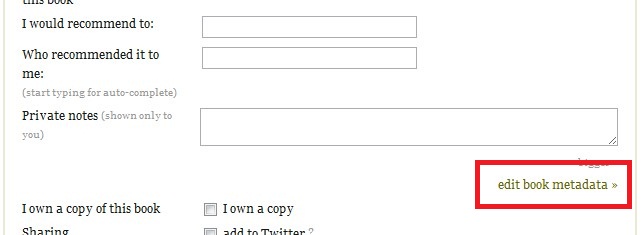
To access the Book Metadata at Goodreads, first click on the “edit review” link of any book you’ve read. On the next page, toward the bottom, you’ll click on the “edit book metadata” link.  If you have not read a book, Goodreads requires that you become a “librarian” to edit the Book Metadata.

Goodreads also allows some users to become Librarians, meaning they are able to edit not only book metadata, but also all information about a book including authors, descriptions, publishers, page numbers, and on and on. I highly recommend applying for librarian status. Not only am I an organization nerd, I love being able to more fully control the data with the books I’ve written.

LibraryThing (refers to enhanced metadata as Common Knowledge)

LibraryThing is yet another book networking site, and in my opinion is the least user-friendly. But readers use it, so as an author it’s important for me to be there.

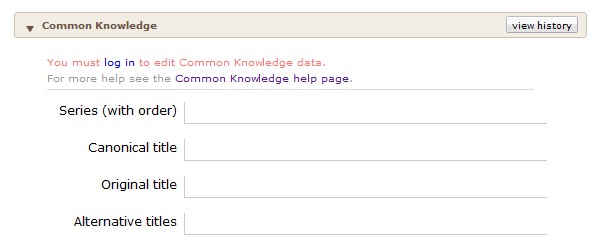
To access the Common Knowledge section, simply open up an existing book page and scroll down to about the middle of the page.

More information about the LibraryThing Common Knowledge metadata can be found here.

Additional information on metadata (as well as general SEO information for authors) can be found in this amazing PBS.org article, “A Self-Publisher’s Guide to Metadata for Books.”

top photo credit: http://www.flickr.com/photos/leprecon/

They Know Your Name, but They Aren’t the Ones You Want. Directional Marketing for Authors

Posted on by Caleb J Ross in SEO for Authors | Leave a comment

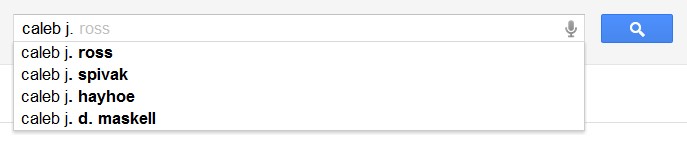
Back in November I wrote a blog post about standardizing your name for search engines. One of the most common responses I received from this post was from authors with unique pen names who cited their unique names as a reason to exempt them from the post’s advice. Basically, their ideas went that a writer with an uncommon name—we’ll use Maximus Pandroistien for this example—should not be worried about being outranked by other websites in a search results page because the likelihood of a similar name existing is nil. While this logic is true, it is narrow-minded. And please, pass along my condolences to Mr. Maxie Pandy and his presumably horrible childhood.

But here’s the important bit: potential readers who already know your name are not your target demographic. After all, they already know about you. You want to reach those who may be interested in your style of work but have no idea you exist. This is the difference between branding and directional marketing (branding = getting your name out there; directional marketing = being available when/where customers are looking).

Your Domain Name

Your initial focus should be your domain name. If you are able to buy your own name (branding) definitely do. Though search engines will try to downplay the power of keywords in a domain name (see this video of Google Matt Cutts dancing around the issue) research consistently speaks to their importance. In fact, in the aforementioned name standardization post, I speak to own troubles with acquiring my own name as a domain.

So, what if your name isn’t available as a domain name? Then, you are free to focus on directional marketing names, ones that speak to your writing in terms of content, aim, or marketing desire. For example, I currently own the domain names TheSocialMediaAuthor.com and NoirLiterature.com, which contain keywords that speak to the content I create. (note: these two domain names aren’t the best examples, as they currently redirect to CalebJRoss.com; in order for keywords in domains to matter to search engines, the domains generally have to represent unique sites. Search engines are smart enough to know when people are trying to game the system by buying and redirecting keyword-stuffed domains).

Your Site Content

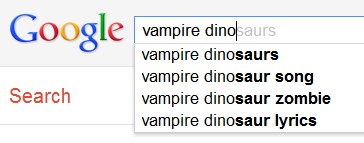
Now that you’ve taken care of your domain name, the next consideration should be the actual content of your site. When writing content, whether that is pages or blog posts (or meta content, which is a different post entirely), keep your desired keyword targets in mind. If you write about vampire dinosaurs on mars, use phrases that speak to that content as often as possible. Of course, keep readability in mind; don’t stuff your content full of keywords solely for the sake of the search engines.

The basic idea is to help your website rank for search terms that could lead to more readers. When someone types in “book about vampire dinosaurs” or “I want to read about dinosaurs and vampires” or “are vampire dinosaurs real?” then you want your website (and by extension, your book) to appear in the results.

When blogging, write about themes in your book, the characters, the plot, and any other interesting element that could be expanded upon in an entertaining way for your blog readers. Pair these ideas with the overall tone you are trying to establish with your content to create something unique that speaks to your personality. For example, if you are a fiction writer, but you also love movies, write about movies that share elements with your books. If you pride yourself on knowing about cutting edge technological advances, writing about how new technology helps you as a writer of vampire dinosaur fiction.

Of course, all this speaks solely to on-site content. I haven’t even touched off-site elements yet (social networks, inbound links to your site, and offline media). I’ll save those for a future post.


Subscribe to be immediately notified when new posts go live:


I lost $ 75.48 on a Facebook ad campaign, and you can too! -OR- Can Facebook ads sell books? Quick answer: no. Long answer: noooooooooooooooo.

Posted on by Caleb J Ross in Marketing, SEO for Authors, Tests and Studies | 15 Comments

(part of my ongoing Search Engine Optimization for Authors series[1])

Part of being a great author-marketer is knowing how to filter promotion time wastes from time worthwhiles. Some options are simple to filter. “Should I do a Goodreads.com giveaway to attract potential readers?” Yes (all it costs is the price of a few copies of a book to receive interest from hundreds of readers). “Should I rent a billboard for a month?” No (billboards offer either 1) travel-oriented products/services or 2) products with a high profit margin). Some options aren’t so simple. And in the case of the Facebook ad, prominence adds to the should I or shouldn’t I debate. Well, I’m here to help. Read more

  1. [1] I understand that paid search ads aren’t traditionally umbrellaed under search engine optimization. However, because tracking and optimization is involved, I’m including it in the series

How can authors use Google Analytics Events Tracking to understand their readers?

Posted on by Caleb J Ross in SEO for Authors | 2 Comments

How many times did readers download your sample chapters? How many times did readers view your new book trailer? How many times did your website visitors click a button to buy one of your books? How many times did someone click a link to read one of your stories posted at another website? All of these items can be tracked using Event Tracking in Google Analytics.
What is Event Tracking? I’ll leave the details up to Google itself, but for our purposes think of Event Tracking as a second, deeper level of website analytics. Most of you are probably using your analytics program primarily to track how users interact with your website on a macro level (how many visits, most popular pages, how long visitors stay, etc). Event Tracking allows a micro level of tracking, where actual clicks and downloads on specific pages can be tracked.

Anywhere a user can click, Event Tracking can be used. Let’s look at an example that an author could definitely use. Read more

Wp Plugin by capn3m0